
 Industrial Automation
 Edge Computing
 Industrial Networking
 Intelligent Connectivity
 HMI’S & Panel Meters
 Industrial Rugged Mobile Platform
 Software
 Cyber Security
 Oil & Gas
 Power and Energy
 Intelligent Transportation
 Smart City & IoT
 Smart Factory
 Industrial Cloud Solution (IIoT)
 Water And Waste Water
 Building Management System (BMS)
 Security & Surveillance

Managed vs Unmanaged Switch: 5 Critical Differences for Better Networks
Managed vs unmanaged switch — it’s one of the first calls you have to make when building an industrial network. A five-minute outage in an office means a delayed email. On a factory floor, it can stop a production line. That gap is why this decision matters more in a plant than in a corporate office.
Every industrial network needs a network switch to move data between connected devices — controllers, sensors, HMIs, cameras, computers. Whatever you pick at the start shapes how that network behaves for years. Quick answer: a managed switch gives you configuration, monitoring, VLANs, QoS, and security features. An unmanaged switch is just plug-and-play. Which one you need depends on how big, complex, and reliable your network has to be.
What Does a Switch Actually Do
A network switch sits in the middle of a wired network. Data comes in from one device, and it sends that data to wherever it’s supposed to go. Older hubs used to blast every signal out to every port — switches don’t do that. They read basic address info and only send data where it actually needs to go.
That holds whether it’s a cheap five-port box under a desk or a rack-mounted unit running a whole production floor. The forwarding part isn’t what makes one different from the other — it’s how much control and visibility you get over that process.
A basic unit does nothing besides that forwarding job — no logs, no alerts, no way to see what’s happening on the wire. A fully configurable one adds a layer on top: it can watch which ports are busy, flag one that’s acting up, and change how traffic moves if something fails. Same delivery job underneath, completely different amount of oversight sitting on top of it. That difference is the foundation the entire managed vs unmanaged switch decision is built on.
What Is an Unmanaged Switch
This is about as basic as networking hardware gets. Plug it in, connect your devices, and it works — no setup, no configuration screen, no login.
The device just moves data between whatever’s connected to it, with no intelligence about what that data is or whether it should go through first. There’s no processor running configuration software, no memory storing settings — just switching hardware wired to make its own forwarding decisions, port to port. That’s also part of why these units run cooler, stay smaller, and rarely fail unless something physically damages them.
Where it fits well:
- A small, isolated machine loop — think a PLC talking to a local HMI plus a few I/O modules
- A network that’s not connected to a wider plant system or outside LAN
- Anywhere cost and simplicity matter more than visibility
- A temporary or test setup where the wiring’s going to change again soon anyway
The trade-off: you can’t watch traffic, isolate a faulty device, or control how data moves. If a cable gets crossed, or something starts flooding the line, there’s no dashboard warning you. Usually the first sign something’s wrong is that something downstream just… stops working. And fixing it means physically tracing cables and swapping devices one by one until you find the culprit — which can burn an entire afternoon once you’re past a handful of connections. Keep this in mind heading into the managed switch side of the managed vs unmanaged switch comparison.
What Is a Managed Switch
This version hands full control to whoever’s running the network. You can set up ports individually, watch traffic in real time, split the network into zones, and decide which types of data get priority.
There’s a small operating system running underneath, with its own processor and memory. That’s what makes the configuration screen, SNMP monitoring, and port-level controls possible — the device is actively making decisions about traffic instead of just passing it along. You reach it through a web interface, a command line, or a network management platform.
Where it fits well:
- SCADA backbones and plant-wide control networks
- Any setup running multiple industrial protocols at the same time
- Networks that need remote access, diagnostics, or a link into broader IT systems
- Basically anywhere an engineer needs to catch problems before they cause downtime, not after
The trade-off: it costs more going in, and you need someone who actually knows what they’re doing to set it up right. But for a plant where downtime is expensive, that investment usually pays for itself the very first time it prevents an outage instead of just reacting to one. Worth noting — get the setup wrong, and you can introduce new problems that wouldn’t have existed on a basic network. A misconfigured VLAN, an unused port left wide open. Proper setup ends up mattering just as much as the hardware itself.
Key Differences at a Glance
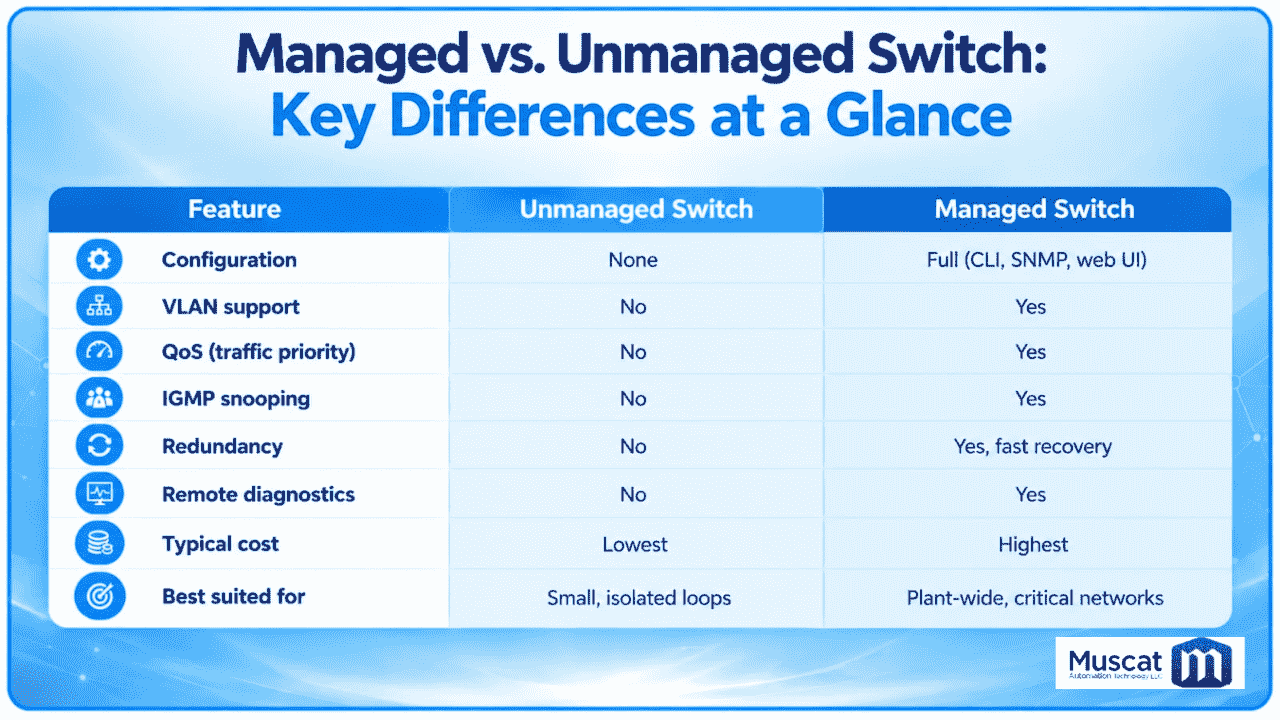
Scan the table row by row, and a pattern jumps out: anything needing active decision-making — VLANs, QoS, IGMP snooping, redundancy, diagnostics — lives in the managed column. The unmanaged column is defined by what it doesn’t have. That’s not a flaw — it’s a trade businesses make on purpose, for a lower price and zero setup hassle.
Managed vs Unmanaged Switch: Key Differences
The difference between managed and unmanaged switch types comes down to one word: control. A basic plug-and-play unit has none — it just moves data along. A configurable one gives you a say in which ports are active, which devices are trusted, and how the network reacts when something breaks.
This isn’t just a software thing — it changes how a network holds up under pressure. On a small office setup, it barely matters. On an industrial floor running dozens of devices across multiple protocols, that same lack of control can turn a small glitch into a plant-wide problem.
Worth mentioning: there’s also a middle option called a smart-managed or “lite-managed” switch, offering basic VLAN and monitoring features through a simpler interface, without the full depth of a fully managed unit.
Hardware and Build Basics Worth Knowing
The managed vs unmanaged switch decision isn’t only about software — the physical build matters too. Both types fall under the same broad umbrella of wired networking hardware, but an industrial-grade unit — whichever type — is usually built to handle wider temperature swings, vibration, and dust, since it often ends up mounted inside a control cabinet rather than a server room.
Port count, speed, mounting style, and power input all vary independently of whether a switch is basic or fully configurable. A small unit might have five or eight ports; a larger one can have 24-plus. DIN-rail mounting is standard on most industrial sites, and industrial units often come with dual DC power inputs so a second source can take over if the first drops. Look for an IP30 or IP40 enclosure rating and a wide temperature range if the switch is going somewhere hot — none of this shows up on a typical office spec sheet, but it’s often the deciding factor on whether a switch survives its first year in the field.
Why Network Switch Choice Matters on an Industrial Network
A network switch can look like a small line item next to the PLCs, drives, and sensors it connects. It isn’t — it’s the piece holding everything together. If it fails or gets overwhelmed, everything relying on it drops at once.
In an industrial setting, that risk snowballs fast. One basic unit feeding a whole control cabinet means every device on it shares the same blind spot — no alerts, no diagnostics, no way to isolate a problem without physically checking every cable. A fully configurable device can flag a failing port, reroute traffic if a link drops, and give an engineer visibility from a control room instead of a walk down the plant floor. This is exactly where the managed vs unmanaged switch decision starts to show its real cost, long after the hardware’s already installed.
A Real-World Scenario
Take two nearly identical plants, each running a bottling line — a PLC, a few sensors, an HMI panel. In plant one, everything runs through a basic plug-and-play unit. A sensor cable develops a fault and starts sending garbage packets onto the line. Nothing on the network can isolate it. The HMI starts lagging, then freezes completely, and now someone’s got to physically unplug devices one by one just to find which one’s causing it. Plant two hits the same fault, but this network runs through a fully configurable device.
An engineer sitting in the control room spots a spike in errors on one port, isolates it remotely, swaps the sensor, and the rest of the line never stops. Same fault. Completely different outcome — and that difference comes straight from everything covered above.
Security Considerations
Security is where the gap in the managed vs unmanaged switch comparison really opens up.
Unmanaged switch security:
- No login, no authentication, nothing — anyone with a cable and physical access reaches every device on it
- No way to separate parts of the network from each other; every port sees the same traffic
- No logging at all, so there’s zero record of what connected, when, or from where
- No way to turn off an unused port — every open one is a way in
Managed switch security:
- VLAN segmentation, so a compromised or misbehaving device on one segment can’t just reach into another
- Port-level security locking a given port to one known device by its MAC address
- The ability to shut off unused ports entirely, closing physical entry points nobody’s using
- Connection logging, so an engineer can check exactly what connected and when, instead of finding out the hard way later
For plants working toward industrial cybersecurity standards, this kind of segmentation and logging isn’t a nice-to-have on a network switch. It’s usually the baseline for keeping operational technology walled off from the corporate network. And in places where physical access isn’t tightly controlled, this gap on its own is often enough reason to go with the more capable option.
Cost Considerations
Price is almost always the first thing that comes up in the managed vs unmanaged switch conversation — fair enough.
Unmanaged switch costs:
- Lowest price of the two, sometimes by a lot
- No setup time, no specialized labor needed
- No licensing, no firmware overhead to keep up with
- The savings hide themselves later, though — troubleshooting eats into that lower cost every time something goes wrong, since there’s no diagnostic data to work from
Managed switch costs:
- Higher price going in, reflecting the extra hardware and features
- Needs setup time from someone who actually knows networking, whether in-house or contracted
- Might involve ongoing firmware updates or licensing depending on the vendor
- That higher cost pays itself back over time — less troubleshooting, fewer surprise outages
That math flips completely once downtime enters the picture. A pricier device that stops even one unplanned outage a year often ends up cheaper overall than a basic one that gives you zero warning trouble’s coming. The real way to weigh cost isn’t the sticker price alone — it’s the sticker price against what an hour of downtime actually costs your operation.
Managed vs Unmanaged Switch: Which One Should You Choose?
The simpler option isn’t automatically wrong. For a small, standalone network with fewer than ten devices and no link to anything bigger, it’s often the smart pick — reliable, cheap, nothing to babysit. The configurable option earns its keep the moment a network needs to talk to other systems, run multiple protocols, or just stay up no matter what. Plenty of well-planned networks use both — basic units out at the edge for simple local loops, and fully configurable ones running the backbone where visibility and control actually matter.
A few questions usually settle it fast: Does this network need remote access? Will it eventually connect to something larger? Would downtime here cost more than a few minutes of annoyance? Answer yes to any of those, and you’re probably looking at the fully configurable option — even if the network feels small right now.
Conclusion
This isn’t about picking whichever device sounds more impressive — it’s about matching the hardware to what the network actually has to do. A small, isolated setup rarely needs the extra cost of a fully configurable unit. A plant-wide backbone running critical processes almost always does. Choosing the right network switch comes down to matching capability to what’s at stake if that hardware ever fails.
Knowing the difference between managed and unmanaged switch options before the network gets built — instead of after something breaks — is what separates a network that scales cleanly from one you’ll end up reworking. A basic unit works fine when a network stays small and self-contained; a fully configurable one earns its keep the moment visibility, security, or uptime actually matter.
Still not sure which fits your setup? Worth talking it through with someone who designs these networks for a living, rather than guessing and finding out the hard way once the plant’s already running.